
Amazon Seller Central Australia: Account Setup, Step by Step
An Amazon Seller Central account is the seller account that lists your products on Amazon.com.au and pays out your sales. The form itself is short. The identity check and the tax details are the steps that need the most care. This walkthrough follows the steps in Amazon's own registration guide and says what each one needs. Amazon's pages were checked on 27 October 2026.
TL;DR: Choose Individual ($0.99 per item) or Professional ($49.95 per month, both excl. GST). Have a government photo ID, proof of address dated within 180 days, a bank account, a phone and an AMEX, VISA or Mastercard ready. Identity verification usually takes four business days or less. Sort out your ABN and GST position before your first sale, not after.
What you need before you start
Amazon's guide lists these prerequisites:
- A business email address, or an existing Amazon customer account
- A chargeable credit card
- A government-issued photo ID
- Tax information
- A phone number
- A bank account and routing number
Individual sellers also need proof of address dated within the last 180 days. A bank statement is one of the accepted proof-of-address documents.
Step 1: Choose a selling plan
Amazon Australia offers two plans:
- Individual: $0.99 (excl. GST) per item sold.
- Professional: $49.95 (excl. GST) per month, charged when you have active listings, regardless of how many items you sell.
Both plans also pay a referral fee on each sale. It is a percentage of the total sale price and depends on the category. Home and Kitchen is 13%, Consumer Electronics is 8%, and anything not listed on Amazon's table is 15%. The category rates are on Amazon's AU pricing page.
The plan choice is a volume question. At $0.99 per item, the Individual plan costs the same as the Professional plan at about 50 items a month. Below that, Individual is cheaper on the item fee. Above it, Professional is cheaper. Referral fees apply on both, so they don't change the comparison.
Worked example, using only the two Amazon fees:
- 20 items a month: Individual costs 20 × $0.99 = $19.80. Professional costs $49.95. Individual is $30.15 cheaper.
- 60 items a month: Individual costs 60 × $0.99 = $59.40. Professional costs $49.95. Professional is $9.45 cheaper.
Your own volume decides it. If you are testing a handful of products, start on Individual and move up once the item count is steady.
Step 2: Sign up and set your business type
Start at sell.amazon.com.au and sign in with an existing Amazon customer account, or create a seller account tied to a business email. Amazon asks for a company registration number. Its guide says this can be your ABN or your ACN.
If you operate as an individual, or your business is not incorporated, the guide says to select "None, I am an individual". The documents you upload depend on which type you pick, so set this correctly the first time.
Step 3: Add your phone and payment card
Enter your phone number with the country code. Amazon may send a text message to the primary number on the account, so use a number you can receive on during the registration.
Amazon accepts AMEX, VISA and Mastercard. It does not accept prepaid cards, gift certificates, cheques, or online payment systems such as PayPal.
Step 4: Pass identity verification
Amazon offers two methods: Instant Identity Verification, which uses a photo of your face and your ID, or Video Screening Verification. Amazon says identity verification usually takes four business days or less. It also says in many cases the process can be completed in just a few hours, and that timelines can vary.
Step 5: Bank and tax details
Amazon needs a bank account and routing number to pay out your sales. It also asks for "tax information" but does not say which tax ID it expects. Its business verification list includes a "tax clearance certificate or GST (Goods and Services Tax) registration", which is where the GST question comes in.
Two GST rules from business.gov.au shape the answer:
- You must register for GST once your GST turnover reaches $75,000 or more, and within 21 days of becoming aware your turnover will go over the threshold.
- Below that threshold, GST registration is optional.
Whether you cross the threshold, and what that means for your pricing, is a question for your accountant. The business.gov.au GST registration page has the turnover rules.
Document rules at a glance
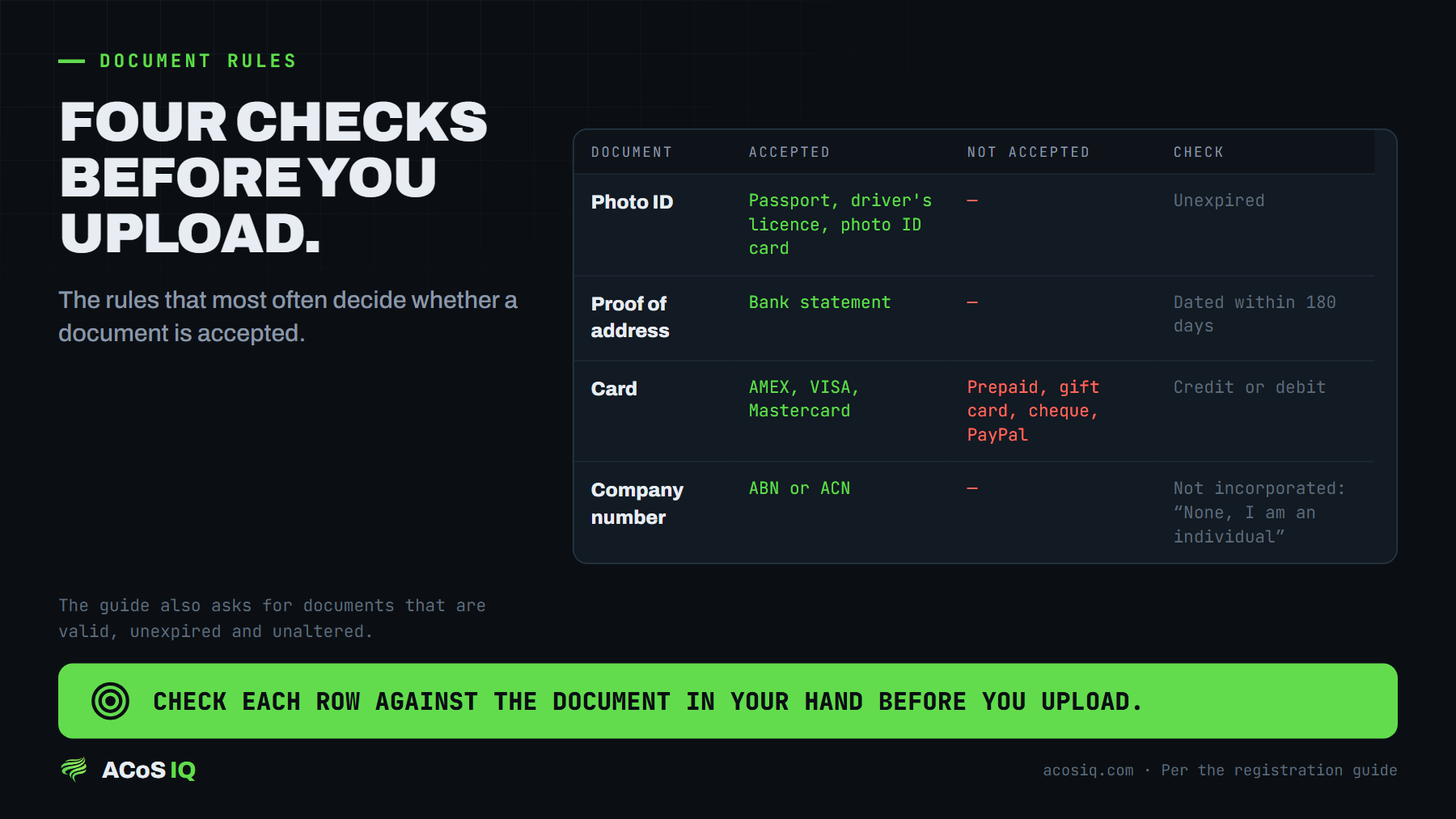
Amazon's guide sets the rules that most often decide whether a document is accepted. Check each one before you upload:
| Item | What Amazon's guide says | Check before you upload |
|---|---|---|
| Photo ID | Passport, driver's licence or photo ID card are accepted; the guide's individual checklist names a government-issued photo ID | Is it the ID you will use for verification, and is it unexpired? |
| Proof of address | Dated within the last 180 days; a bank statement is accepted | Is the date within 180 days of the day you upload it? |
| Card | AMEX, VISA or Mastercard | Is it a credit or debit card, not prepaid or a gift card? |
| Company number | ABN or ACN, for a registered business | If you are not incorporated, select "None, I am an individual" |
The guide also asks for documents to be valid, unexpired and unaltered. A document that has been edited does not meet that requirement.
Before you press submit
Run through this list once the form is complete:
- The business type matches your documents.
- The phone number includes the country code and can receive texts.
- The bank account and routing number are the account that will receive your payouts.
- The plan you chose is the plan you intend to run for the first month, because the Professional fee is charged on completion.
- You are checking the inbox for the verification outcome, which Amazon sends by email.
After registration
A live account is the start, not the finish. The work that decides whether a seller makes money is the product, the listing and the fees on each sale. The fee maths for FBA is in the Australia FBA fee breakdown. For how the ad side changes once you are selling in Australia, read Amazon Australia PPC vs the US before you set a single bid.
If your account is already selling and the ads are spending without a clear return, that is what the free audit covers: wasted spend, ACoS and bid structure. It starts with a 45-minute call on your business and your listing, then a written audit of your last 60 to 90 days of campaign data with the three highest-leverage fixes.
FAQ
How long does Amazon Australia seller verification take?
Amazon's registration guide says identity verification usually takes four business days or less. It says in many cases the process can be completed in a few hours, and that timelines can vary.
Do I need an ABN to sell on Amazon Australia?
Amazon's registration guide does not say an ABN is mandatory. It describes an ABN as a unique 11-digit number issued by the government, and lets you enter an ABN or an ACN as your company registration number. Business.gov.au says you must register for GST once your GST turnover reaches $75,000 or more.
What does a Seller Central account cost in Australia?
The Individual plan charges $0.99 (excl. GST) per item sold. The Professional plan charges $49.95 (excl. GST) per month when you have active listings. Both plans also pay a category-based referral fee on each sale.
Which cards does Amazon accept for seller registration?
Amazon's guide lists AMEX, VISA and Mastercard. It says prepaid cards, gift certificates, cheques and online payment systems such as PayPal are not accepted.
Want these fixes applied to your account?
Book the free audit